For organizations whose servers are aging and whose next step would otherwise be buying hardware again.
We move servers, applications, and data to Azure in waves, into a landing zone built first. Each application is tested with its owners before cutover, and backups are validated in Azure.
Servers and applications move into a landing zone built first, each tested by its owners before cutover, with upgrades on the way where they pay. Running Azure afterwards is Managed Azure and Microsoft 365.
Azure landing zone
The governed foundation to move into: tenant and subscriptions, network and perimeter, identity, naming, policy, Key Vault, and the connectivity back to your sites.
What you get
Architecture document with diagrams: tenant, network, storage, servers, backup, DR
Resource groups, naming, and baseline security controls
ExpressRoute or VPN to your sites, so users reach moved servers as before
Active Directory for the Azure environment, with delegation
Best for
A first Azure footprint, or one that grew without rules.
Operating systems upgraded, servers converted to platform services where it pays, and file shares moved with permissions intact, instead of lifting old problems into Azure.
What you get
Windows Server upgrades and replacement builds
SQL Server upgraded or moved to Azure SQL
Virtual machines to platform services where it fits
File shares to Azure Files, DFS, or SharePoint, permissions kept
Drive mappings and scripts remediated
Best for
Windows Server versions out of support, and shares nobody wants to touch.
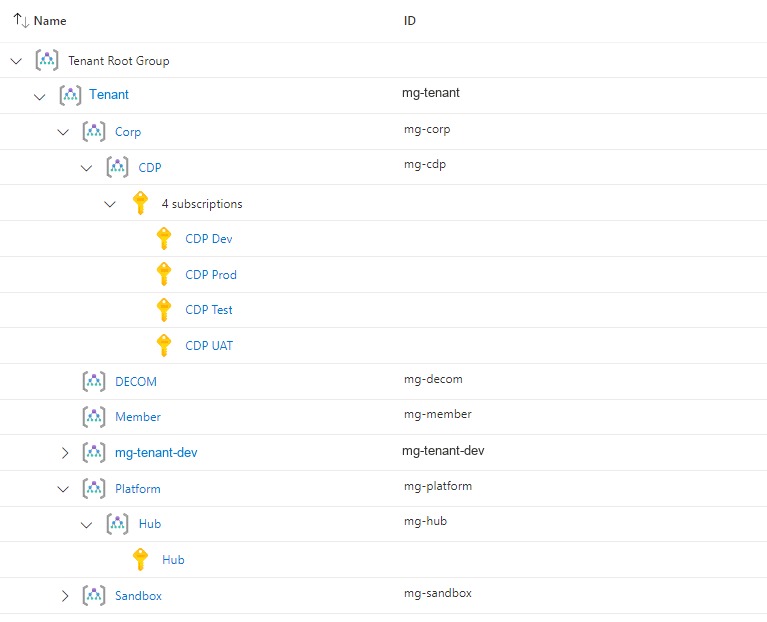
Corp, platform, sandbox and decommission groups, each with its subscriptions: the landing zone a migration lands in. A credit union in Texas. Tenant name replaced, subscription ids removed.
A global engineering nonprofit ran its systems from two aging data centers.
Delivered 2020Read more
Questions we get
How long does a data center migration take?
It depends mostly on how many servers and applications move. A data center of a few dozen servers typically takes three to six months from design to the last cutover, most of it replication and application testing. The proposal sets the length of the Assess phase at the start.
Will our applications be upgraded as part of the move?
Only if we scope it. By default servers move as they are, so the move and the upgrade are not blamed on each other. Upgrades on the way, such as new operating system versions or platform services, are their own option, chosen per application.
What changes the size of an Azure migration?
Mostly how many servers and applications move, and how much data. Whether workloads move as they are or get upgraded changes it too, as do the connectivity Azure needs to your sites and the documentation that exists.
Who tests the applications?
Their owners, with us. Each application is tested in an isolated Azure environment before cutover and signed off by the people who know it. Applications without an owner are the first risk the Assess phase flags.
Talk to us about Azure Migration
It starts with a 60-minute call. If we need more to scope it, a short questionnaire follows. Then a written proposal and statement of work. Once you approve, we begin with the Assess phase.