For organizations with alerts from several tools and no one seeing the whole picture, or a vulnerability scan backlog with no owner.
We deploy and tune Microsoft Defender XDR across devices, identities, email, and cloud apps. Microsoft Sentinel takes the logs beyond Microsoft, and hardening closes what the scanners find.
Defender XDR puts Microsoft alerts in one incident queue, Sentinel or the SIEM you already run adds the other log sources, and hardening works down the scan backlog.
Microsoft Defender XDR
Defender across endpoints, identities, email, and cloud apps, deployed with baseline policies and alerts investigated in one portal.
What you get
Devices onboarded to Defender for Endpoint
Defender for Identity sensors on domain controllers
Email and collaboration protection with safe links and attachments
One incident queue across all of them
Best for
Defender already licensed, with endpoints, identities, and email still watched in separate consoles.
Microsoft Sentinel onboarding and tuning
Estimated 6–12 weeks
Sentinel in your own workspace: connectors, analytics rules, workbooks, watchlists, and playbooks, tuned until the false positives are down and the baseline is agreed.
What you get
Connectors for Microsoft and third-party sources
Severity-tiered analytics rules mapped to MITRE ATT&CK
Playbooks for isolation, account disable, and session revoke, under your approval rules
Ingestion costs reviewed and trimmed
Your sign-off on the agreed detection baseline
Best for
Log sources beyond Microsoft, or retention longer than Defender keeps.
Security logs into your SIEM
Typically about 5 weeks
Microsoft Entra ID, Microsoft 365, and Defender logs streamed through Azure Event Hubs into the SIEM you already run, validated source by source.
What you get
Event Hubs namespace and app registration deployed and secured
Entra ID, Exchange, SharePoint, and Defender sources connected
Raw-log ingestion validated in the SIEM
Resources tagged so the security office sees the cost
A deployment document for handover
Best for
A security office that runs its own SIEM and wants the Microsoft logs in it.
Vulnerability remediation and hardening
The scanner’s findings worked down and CIS Critical Security Controls implemented across domain controllers, servers, laptops, and desktops, with test and validation reports.
What you get
Prioritized implementation plan from your scan reports
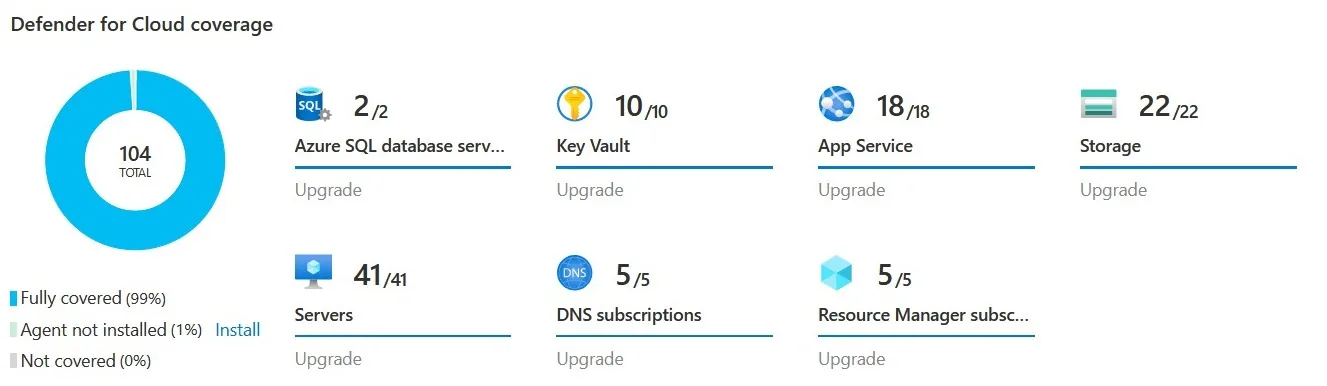
Servers, databases, key vaults, app services and storage, all under Defender for Cloud, in an Azure environment we built and secured. A credit union in Texas.
A statewide system of 12 community colleges and a system office needed one directory across its campuses, one way to manage devices, and its servers migrated.
Delivered 2025Read more
Questions we get
Do we need Microsoft Sentinel, or is Defender enough?
Defender XDR covers detection and response across endpoints, identities, email, and cloud apps, and many organizations start there. Sentinel adds a SIEM for log sources beyond Microsoft, longer retention, and detections that correlate those sources. The Assess phase shows which gaps you have before you license more.
How long does Sentinel onboarding take?
It depends on how many log sources Sentinel takes and how much tuning the detections need. The estimated length is listed with Microsoft Sentinel onboarding above. Connectors go first, then analytics rules and playbooks, then tuning until the false-positive rate is down and the baseline is agreed. Sentinel sits in a workspace you own, so nothing is lost if the engagement ends.
Can you send Microsoft logs to the SIEM we already have?
Yes. We stream Entra ID, Microsoft 365, and Defender logs through Azure Event Hubs into your SIEM and validate each source. Queries, dashboards, and alert handling inside your SIEM stay with your team unless we scope them.
Who watches the alerts after you set it up?
Your team, ours, or a security operations partner we bring in and stay accountable for. Day-to-day monitoring and response is Managed Security, and the agreement says who contains what and who approves it.
What changes the size of a Threat Protection project?
Mostly how many devices, identities, and mailboxes are in scope, and whether you need Sentinel or only Defender. After that, it is which log sources Sentinel must take and how long the vulnerability backlog is.
Do you own the vulnerability scanning?
No. You license the scanner, and in this project we read its results and work the backlog down. If you have none, the Assess phase recommends one, and Defender’s own vulnerability management is often enough to start. The plan can come from a CIS Controls gap assessment, and Managed Security works the ongoing backlog after the project.
It starts with a 60-minute call. If we need more to scope it, a short questionnaire follows. Then a written proposal and statement of work. Once you approve, we begin with the Assess phase.