For organizations where a password is the only lock, or where accounts outlive the people who used them.
We make sign-in the lock with Microsoft Entra ID, MFA, and Conditional Access. Administrators are held to a tiered model, accounts follow your HR or student system, and applications move to one sign-in.
The baseline comes first, then a stricter model for administrators and accounts kept in step with your HR or student system. Applications then move behind the same sign-in.
Entra ID baseline
MFA and Conditional Access for each user and administrator account, with emergency access accounts excluded by design, plus self-service password reset and sign-in names aligned with email.
What you get
Conditional Access policies, piloted on a test group first
MFA methods and self-service password reset rolled out
Emergency access accounts and admin MFA
Risk-based policies with Entra ID Protection
Best for
Staff signing in from home and personal phones with nothing but a password.
Accounts created, updated, moved, and removed from your HR or student system through Microsoft Identity Manager or Entra provisioning, with group memberships saved on exit.
What you get
Requirements and use-case documents, validated with HR or the registrar
Synchronization rules for joiners, movers, leavers, and status changes
Password sync and change notification
Development and production environments, with QA by your team before cutover
Knowledge transfer after go-live
Best for
A semester’s worth of accounts created by hand, and leavers whose access stays open.
Applications on one sign-in
Enterprise applications moved from Active Directory to Entra ID sign-in, hybrid-joined workstations, passwordless sign-in with Windows Hello, and VPN replaced by Global Secure Access.
What you get
Application inventory by sign-in method
SAML and OpenID Connect single sign-on set up
Hybrid join through Microsoft Entra Connect, with a step-by-step guide
Windows Hello for Business for passwordless sign-in
Global Secure Access in place of VPN for private applications
Best for
Applications that still authenticate against the old directory.
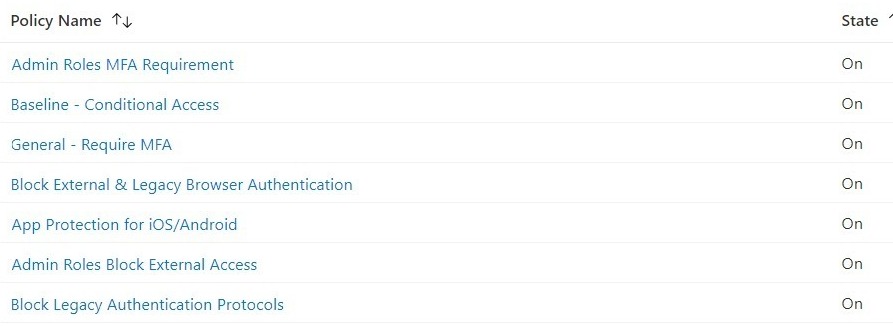
The policy set behind sign-in: MFA for admin roles and for everyone, legacy authentication blocked, app protection on phones, device policies per application. A credit union in Texas. Client prefix removed from each policy name.
A statewide system of 12 community colleges and a system office needed one directory across its campuses, one way to manage devices, and its servers migrated.
Delivered 2025Read more
Questions we get
Do you work with what we already have, like Okta?
Yes. We’ve integrated Okta MFA alongside Microsoft 365 before, and we plan around existing tools rather than replacing them by default.
Will MFA lock people out?
Not if it is piloted. Conditional Access policies go to a test group first, and emergency access accounts are in place before anything is enforced. Self-service password reset goes out with it, so the help desk is not the only way back in.
How long does identity automation take?
It depends on how many systems feed identities and how soon your rules for status changes are defined. The typical length is listed with identity lifecycle automation above. Weekly meetings run through the build, and your team does the final testing. Disablement can run only after you define the rules, such as which fields mark a leaver.
What is a tiered administration model?
Administrators get separate accounts for separate tiers, so a compromised help desk account cannot reach the domain controllers. Privileged roles are activated when needed and expire, admin work happens from hardened workstations, and emergency access accounts are held back for when normal sign-in fails.
What drives the effort in an identity project?
It comes down to how many accounts and directories are in scope and whether an HR or student system feeds identities. The number of applications moving to Entra sign-in and how far the privileged access model goes also count.
Can you consolidate several directories?
Yes. Combining several Active Directory domains into one forest is Active Directory Migration and Consolidation, and the identity hygiene on this page is built into it.
It starts with a 60-minute call. If we need more to scope it, a short questionnaire follows. Then a written proposal and statement of work. Once you approve, we begin with the Assess phase.