For organizations with Windows 10 past its support date, devices still set up by hand, or a mix of management tools.
We move your devices to Windows 11 and Intune, so new devices set themselves up and updates go out in rings you can report on. Cloud PCs or Azure Virtual Desktop cover the desktops that belong in the cloud.
Devices move to Windows 11 under Intune, with Configuration Manager kept alongside where a fleet still needs it, and Cloud PCs for work that shouldn’t sit on a laptop.
Windows 11 upgrade
Windows 10 devices upgraded to Windows 11, with your applications tested first and Extended Security Updates as a bridge where you need one.
What you get
Hardware and application compatibility checked
Windows Update rings in Intune, with deadlines and reporting
A pilot ring before the broad rollout
Best for
Laptops still on Windows 10 after its October 14, 2025 end of support.
Intune and Autopilot
Scoped per device count
Devices that set themselves up out of the box, with compliance, security baselines, and apps applied on first sign-in.
What you get
MDM authority, roles, groups, and enrollment restrictions
Autopilot profiles, enrollment status page, and naming
Security baseline, BitLocker, Defender settings, and app assignments
Compliance policies tied to Conditional Access
Android Enterprise for corporate phones
Best for
New devices set up by hand, and no one able to say which ones are compliant.
Configuration Manager and patching
Patching and operating system deployment on Configuration Manager, alongside Intune, for fleets that still need it.
What you get
Configuration Manager designed and deployed to Microsoft’s recommended settings
Third-party applications patched with Patch My PC
Operating system deployment and software distribution
Standards, procedures, and training for the team that runs it
Best for
Domain-joined fleets, or several IT groups that patch their own devices on a shared platform.
Cloud PCs and Azure Virtual Desktop
Desktops delivered from the cloud for contractors, remote staff, and applications that should not live on a laptop.
What you get
Windows 365 Cloud PCs, or Azure Virtual Desktop with Nerdio
A golden image with Microsoft 365 Apps and your business applications
FSLogix profiles and host pools set up in your Azure subscription
Virtual machines locked down to Microsoft’s recommended settings, with an image-update procedure
Best for
Contractors or remote staff who need a managed desktop, or Citrix and Horizon desktops spread across business units.
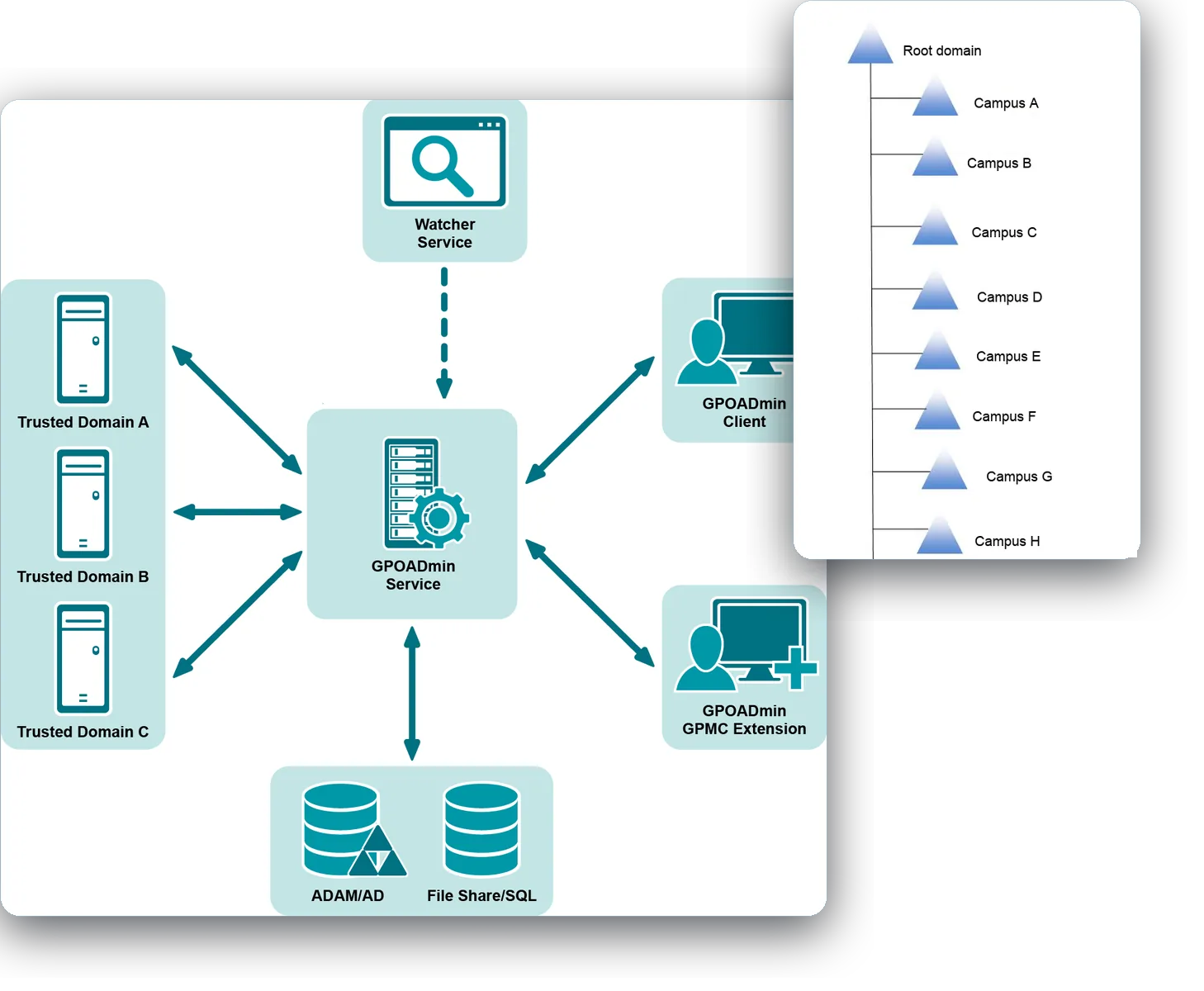
From our assessment for a statewide higher education system: the campus directories as we found them, and the tooling that moved accounts, devices and policies into one environment. Campus names replaced with placeholders.
A statewide system of 12 community colleges and a system office needed one directory across its campuses, one way to manage devices, and its servers migrated.
Delivered 2025Read more
Questions we get
Windows 10 is out of support. What are our options?
Upgrade the devices that can run Windows 11, replace the ones that can’t, and buy Extended Security Updates only as a bridge for the stragglers. The Assess phase tells you which devices fall in which group.
Intune or Configuration Manager?
Intune for cloud-managed devices, and Configuration Manager where you still need operating system deployment or on-premises patching at scale. Many organizations run both for a while, with devices co-managed, and retire Configuration Manager when nothing needs it.
How long does an Intune rollout take?
The total depends on device count and how many devices are already managed. The Intune build and a pilot ring run over weeks, then devices enroll in waves with extra support after each. The Assess phase at the start typically takes 1–2 weeks.
Will our applications still work on Windows 11?
Most do. We test your applications on a pilot ring before the broad rollout and keep a list of exceptions with the fix or the workaround for each.
What decides the size of a Windows 11 and Intune project?
The device count and mix come first, and whether Configuration Manager manages the devices today or nothing does. After that come the number of applications to test and any desktops that should run in the cloud.
Do we need new hardware?
Only for devices that can’t run Windows 11. The Assess phase checks each device against the requirements, so the replacement list is a count, not a guess.
Talk to us about Windows 11, Intune, and Cloud PCs
It starts with a 60-minute call. If we need more to scope it, a short questionnaire follows. Then a written proposal and statement of work. Once you approve, we begin with the Assess phase.